
Update (September 2026): this post first announced the Totem Compass App’s launch in 2025. It’s been rewritten to cover the app as it works today, with Totem Compass Version 5.0.
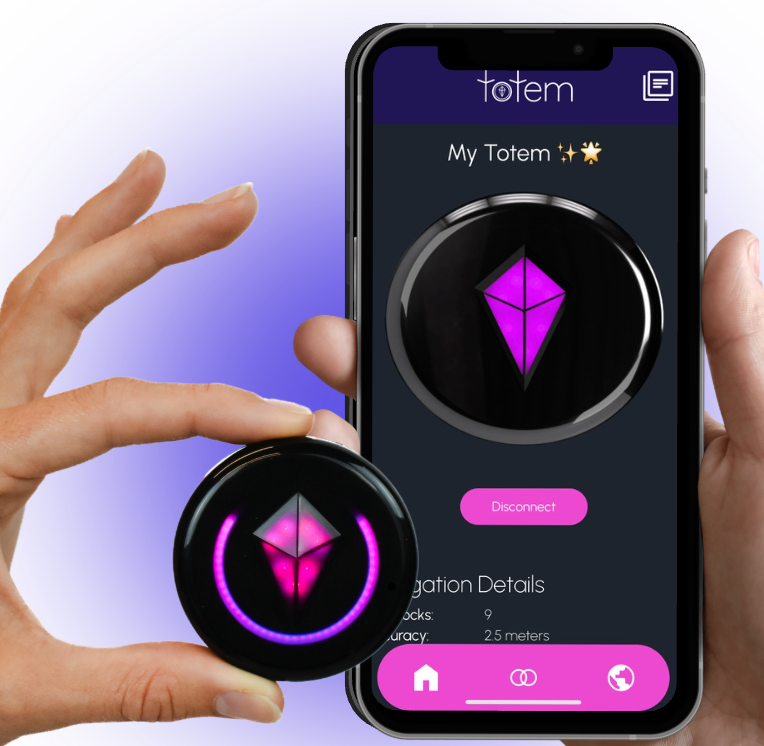
The Totem Compass App is a free, optional companion app for iOS and Android. Connect it to your Totem Compass over Bluetooth to update your Totem’s software, name and color your Bonds, see maps (including offline event maps), and drop meetup points. If you choose, its Cloud Communications feature can also help you find friends beyond the reach of nearby Totems, as long as both of your phones have a connection.
Your Totem doesn’t need the app. Bonding, navigation and SOS all work on the device itself, without a phone. The app just gives you more control.
New here? The Totem Compass is a screen-free wearable that helps you find your friends without relying on cell service. Pick a friend, follow the lights, go find your people.
Download it free on the App Store or Google Play.

Do You Need the Totem Compass App?
No. Every core Totem feature works without a phone: Bonding, navigating to your friends, reading the lights, and sending an SOS to your Bonded friends. That’s the whole point of a screen-free friend-finder.
The app is for when you want extras: easier software updates, named Bonds, maps, and settings you can’t reach from the device alone. It needs no account and no login.
How to Connect Your Totem Compass to the App
- Download the Totem Compass App from the App Store or Google Play.
- Turn on your Totem and double-click the Power Button to start Bluetooth pairing. The light breathes blue while it’s ready to pair.
- Open the app and follow the pairing prompts.


Battery tip: Bluetooth uses extra power. When you’re done with the app, double-click the Power Button again to turn Bluetooth off.
What You Can Do With the Totem Compass App
Update Your Totem’s Software Over Bluetooth or Wi-Fi
This is the big one. Totem releases free software updates that improve battery life, navigation and the Unity Mesh Network™ (the network Totems use to relay messages to each other through a crowd). Version 5.0, for example, added Auto-Calibration and up to 12+ hours of battery life in Vibe Mode.
The app checks which version your Totem is running and shows New Update Available when you’re behind. You can update two ways:
- Bluetooth (on the go): Compass Settings → Firmware Update → Update with Bluetooth → Send to Compass.
- Wi-Fi (at home): Compass Settings → Wi-Fi Network (add your network and password) → Firmware Update → Update with Wi-Fi. Use a 2.4 GHz network and charge your Totem above 50% first.
If your Totem is running software from before Bluetooth updates, you’ll need to update it once with the HotSpot method in our Software Update Guide. After that, the app handles it.

Because updates are this easy now, our Engineering team can ship improvements more often, including tweaks based on data from major festivals.
Name, Color and Manage Your Bonds
Bonds are the connections between two Totem Compasses, and each Totem can hold up to 8. In the app, you can:
- Name each Bond, so “the pink one” becomes “Maya”.
- Pick Bond colors from an expanded palette. Want a Purple Bond? Orange? Fuchsia?? Go for it. 🌈
- Show, hide or delete Bonds to keep your Compass focused on the people you’re looking for right now.
- Name your own Totem. Your name shows up in your friends’ apps when they Bond with you.
- Turn on Compass Lock to help keep Bonds and settings from being changed by accident. It’s handy when you’re handing out Totems to a group or to kids.
We’ve always kept Totem simple, especially as a screen-free device, so the original Bond colors were designed with purpose. But now that there’s a configuration screen involved? You’ve got options. 😇
Want your whole group Bonded at once? See 8 Bonds and Smart Groups.
Maps: Live Map, Offline Event Maps and Meetup Points
Sometimes you just want to see where your people are. The app’s map shows your own location, your Bonds’ locations, and SOS status, right on your phone. We really got a real-life minimap before GTA 6. 🎮
- Offline event maps: for supported festivals and events, the app includes event maps you can navigate offline.
- Meetup points: drop a pin, like your campsite or the fallback spot by the Ferris wheel, and your Totem Compass can guide you to it just like it guides you to a friend.
Cloud Communications: Find Friends Beyond Mesh Range (Optional, Needs Connectivity)
Your Totem finds friends by talking directly to other Totems, relayed through the Unity Mesh Network at big events. No cell service required. But what if your friend has gone back to the hotel, or wandered off on a long hike?
That’s what Cloud Communications is for. It’s sometimes called “Limitless Range”, but here’s what that actually means. When you and your Bonded friend both have your Totems connected to the app, your phones can share small location updates through Totem’s cloud. You can then see each other on the map and navigate to each other from any distance, as long as both phones have at least a bar of service. Each location update is tiny, roughly a tenth the size of a text message, so it can work even when the network is too congested to send a text.
To be clear:
- It’s optional. It only works when both people are connected to the app.
- It needs connectivity. Without service on both phones, you’re back to Totem-to-Totem communication, which is how your Compass works anyway.
- It doesn’t replace the mesh. The Totem Compass is, and will stay, fully functional offline.
Our Privacy Policy explains how this data is handled.
Check Your Satellite Connection and Accuracy
Your Totems have always known how accurate they are. Now you can know, too. 😉 The app shows how many satellites your Totem is locked onto and how accurate its position is in real time, side by side with your phone’s GPS, without needing an internet connection.
It’s a great way to see how buildings, tents or trees affect your signal, and why open sky matters so much.

The Full User Manual, Offline
If you’re stuck at a festival with no cell service and no manual, that confusion hits different. So the app includes the full User Manual offline: step-by-step instructions and explanations of every feature and mode, anytime. Guided tutorials walk new users through pairing, Bonds and the map, and in-app notifications flag things like searching for satellites, SOS alerts, low battery or a disconnected Compass.

What’s Next for the Totem Compass App
We’re still building. Next in the pipeline is offline messaging: short messages between you and your Bonds, sent Totem-to-Totem through the Unity Mesh Network. We’ll announce new features here when they actually ship, not before.
Got an idea for the app? Tell us at tribe@totemlabs.com. A lot of what’s in the app today started as a Tribe request.
Get the Most Out of Your Totem Compass
More than 65,000 people in 80 countries use Totem to find their people. The app is one way to get more out of yours. Updating before every trip is another: see our pre-festival checklist.
Still getting Totems for the crew? The Totem Compass Bundle builder lets you customize the best Bundle for your group size, and you can split the payment with friends at checkout using Paysquad.
Download the free Totem Compass App: App Store · Google Play
Totem Compass Battery Life: How Long It Lasts in Vibe and Eco Mode (Plus a Letter From Our CTO)
How to Set Up Your Totem Compass